

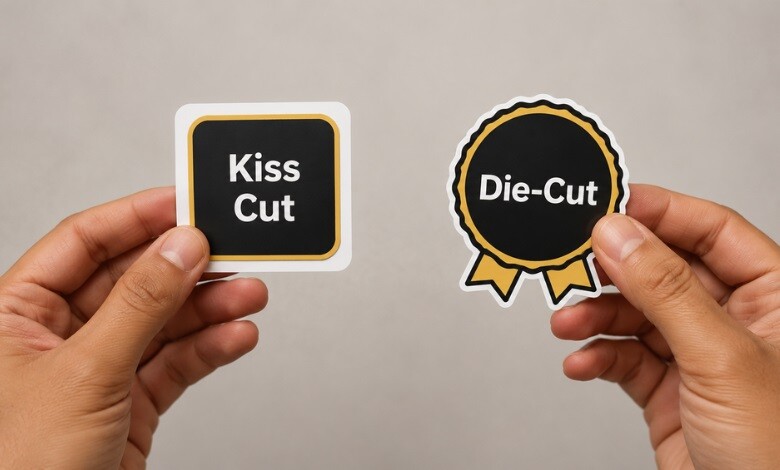
If you print stickers or labels, understanding kiss cut vs die cut is one of the first decisions that shapes the look, feel, and cost of your finished product. Both methods produce professional results, but they behave very differently during production and peeling. This guide breaks down what each Cut is, how they compare side by side, and how the right finishing equipment handles both, so you can choose the best option for every job.
Key Takeaways: Labels In-House
- A die cut goes completely through the material and the liner, creating a contour-shaped piece.
- With a kiss cut, the blade slices the printed face material alone and stops short of the liner, so the backing stays whole, and a thin frame of surrounding material is left in place.
- Kiss cut is ideal for sticker sheets and easy peeling; die Cut delivers a clean, standalone shape.
- A single semi-rotary die cutter can produce both finishes by adjusting blade depth.
-
 Epson C4000 / CW-C4000 ColorWorks Inkjet Label Printer (Gloss) SKU: C31CK03A9991$2,492.00
FREE SHIPPING over $199*
Orders before 12PM EST usually Ship Same Business Day -
 Epson ColorWorks CW-C6000A Matte Color Inkjet Label Printer with Auto Cutter SKU: C31CH76A9981$3,059.00
FREE SHIPPING over $199*
Orders before 12PM EST usually Ship Same Business Day -
 Afinia L801 Plus Commercial Color Label Printer SKU: 32498$8,850.00
FREE SHIPPING over $199*
Orders before 12PM EST usually Ship Same Business Day
What Is a Die Cut?
A die cut carries the blade fully through the face material and the liner together, releasing a piece whose outline matches the artwork with no surrounding margin. This approach is sometimes called contour cutting, and it behaves much like a cookie cutter pressing a shape out of dough. Because nothing frames the design, a die-cut sticker or label reads as finished the instant it is picked up. That makes die cutting a strong fit for custom silhouettes, logo stickers, and pieces meant to be handed out or displayed on their own.
What Is a Kiss Cut?
A kiss cut works in the opposite way. With a kiss cut, the blade slices the printed face material alone and stops short of the liner, so the backing stays whole, and a thin frame of surrounding material is left in place. That frame makes the piece simple to peel, since you can lift the edge of the material without wrestling with the liner. Kiss cutting is the method behind kiss-cut sticker sheets, where several designs share one common backing, and it also shields delicate or detailed artwork during handling and shipping.
Difference Between Kiss Cut and Die Cut
What truly separates the two formats is blade depth: a kiss cut stops at the face material, while a die cut carries on through the liner as well, and that single choice decides whether a backing border remains. With a die cut, the liner is removed along with the design, so the shape is the sticker. With a kiss cut, the liner stays intact, and the Border holds until the user peels the piece away. The difference between die cut and kiss cut can look small, yet it shapes how the product is packaged, peeled, and presented.
Kiss Cut vs Die Cut: Comparison Table
| Feature | Kiss Cut | Die Cut |
| Cutting depth | Top layer only | Through material and liner |
| Liner/backing | Stays intact | Cut to shape |
| Peeling | Very easy, bordered edge | Edge can be harder to start |
| Sticker sheets | Excellent | Single units only |
| Best use | Sheets, packaging inserts, labels | Standalone shapes, giveaways |
| Finish | Border around design | Clean, borderless contour |
What About Transfer Cut?
There is also a third option worth knowing. A transfer cut uses application tape, so multi-piece or layered designs can be moved onto a surface together. It is less common for everyday stickers, but useful for decals with separated elements. For most projects, the practical decision still comes down to kiss Cut vs. die Cut.
How Die Cutters Produce Both Styles
One advantage many businesses overlook is that you do not need separate machines for each finish. A modern semi-rotary die cutter can produce both kiss cuts and full die cuts by adjusting blade pressure and depth, along with the cutting tooling. This flexibility lets a print operation switch between sticker sheets, individual die-cut shapes, and finished labels without changing equipment. TCS Digital Solutions offers a range of digital label finishing systems built for exactly this purpose, including the Afinia DC-250 and Afinia DC-350 semi-rotary die cutters, which handle both cut styles for short-run and on-demand production.
Which One Should You Choose?
Choosing between die cut and kiss cut depends on how the finished piece will be used. Pick a die cut when you want a single, standalone item with a custom shape, such as promotional giveaways or display stickers. Pick a kiss cut when you need easy peeling, want multiple designs on one sheet, or are producing product labels and packaging inserts. If your artwork has thin lines or fine detail, the kiss-cut Border adds protection during handling. Many businesses use both, matching the Cut to each specific order. Kiss cutting and die cutting are the finishing steps in your workflow. They pair with a quality label printer upstream, and TCS Digital Solutions carries print systems from brands like Primera, Epson, QuickLabel, and VIPColor to complete your in-house production line.
For deeper guidance, you can also review independent printing-industry resources such as the Specialty Graphic Imaging Association glossary for finishing terminology.
-
 Afinia DC-350 Semi Rotary Die Cutter SKU: 40982$68,000.00
FREE SHIPPING over $199*
Orders before 12PM EST usually Ship Same Business Day - Afinia DC-250 Semi Rotary Die Cutter SKU: 40464$48,000.00
FREE SHIPPING over $199*
Orders before 12PM EST usually Ship Same Business Day - Afinia L801 Plus Commercial Color Label Printer SKU: 32498$8,850.00
FREE SHIPPING over $199*
Orders before 12PM EST usually Ship Same Business Day
Would you like more information about choosing the right cutting and finishing setup for your print operation? Contact our expert support team at orders@tcsdigitalsolutions.com or call +1 (762) 208-6985. Visit our blog for more insights.
Frequently Asked Questions
What Does Kiss Cut Mean?
It means cutting through only the top layer of material while leaving the liner intact, leaving a border around the design.
Is Die Cut or Kiss Cut Better?
Neither is universally better. Die cut suits standalone shapes; kiss cut suits sheets, and easy peeling.
Are Kiss-cut Stickers More Expensive?
Pricing is usually similar. A kiss cut can be more cost-effective when several designs share one sheet.
Can One Machine Do Both?
Yes. A semi-rotary die cutter produces both finishes by adjusting blade depth and tooling.
Related Blogs
- 5 Benefits of Printing Labels in House
- A Guide to Creating Product Labels for Your Small Business
- Printed Labels: Design Tips and Best Practices
- Best Printers for Small Business

