

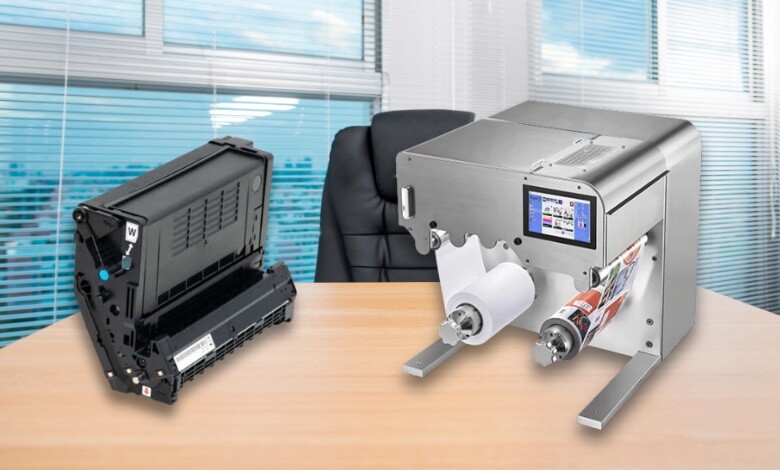
If you run a laser-based printer in your home, office, or label production line, you’ve probably wondered about drum vs toner and which part actually puts ink on the page. The two work together so closely that most people assume they’re the same component, but they perform very different jobs inside your printer. Understanding how each one works helps you replace the right part at the right time, keep your prints sharp, and avoid wasted money.
In this guide, you’ll learn what a toner cartridge is, what a drum unit does, how they work together during a print cycle, when to replace each one, and how different printer designs handle them.
What Is a Toner Cartridge?
A toner cartridge is the container that holds printer toner, the dry, finely ground, plastic-based pigment that forms the text and images on your paper. It is the ‘ink’ of a laser printer, except it is not a liquid at all. This is one of the core differences in the toner vs. ink comparison.
Inside the cartridge, the toner powder carries an electrical charge. A developer roller releases a controlled amount of this powder during each print job. Many modern toner cartridges also include a cleaning blade and a waste toner container that catches excess powder so your prints stay clean and free of smudges.
Toner cartridges come in several formats:
- Standard-yield cartridges for everyday use
- High-yield cartridges for higher print volumes
- Color cartridges (cyan, magenta, yellow, black) for color laser printers
- White toner cartridges for specialty applications, such as printing on transparent or dark label materials.
-
 Afinia LT5C Black Toner Cartridge SKU: 36187$220.38
FREE SHIPPING over $199*
Orders before 12PM EST usually Ship Same Business Day - Afinia LT5C Magenta Toner Cartridge SKU: 36173$220.38
FREE SHIPPING over $199*
Orders before 12PM EST usually Ship Same Business Day - QuickLabel QL-300 TNR300-C Cyan Toner Cartridge SKU: 14880005$203.00
FREE SHIPPING over $199*
Orders before 12PM EST usually Ship Same Business Day
What Is a Drum Unit?
A drum unit, also called a photoreceptor drum, imaging drum, or OPC (Organic Photoconductor) drum, is an electrically charged cylinder coated with a photosensitive material. It acts as the bridge between the toner cartridge and the paper. You can read a deeper explanation in our guide on what a printer drum is.
When you send a print job, a laser beam scans the surface of the drum and changes the electrical charge in specific spots, drawing an invisible electrostatic ‘template’ of your document. The charged areas of the drum then attract the oppositely charged toner powder, forming the shape of your text and images. As the drum rotates and presses against the paper, it transfers the toner pattern onto the page.
Drum units can look quite different across printer models. On larger machines they may be a sizable green or maroon cylinder. On smaller printers, they can be much more compact. The underlying principle of laser printing is the same in every case.
How Toner and Drum Work Together: The Print Cycle
To understand the difference between toner and drum, it helps to walk through one complete print cycle. For a fuller walkthrough, see our guide on how a laser printer works.
- You send a print command, and the drum unit begins rotating.
- A laser beam scans the drum’s surface, creating an electrostatic image of your document.
- The toner cartridge releases charged toner powder, which sticks to the matching areas on the drum.
- The drum rolls against the paper, transferring the toner pattern.
- The paper passes through a fuser, where heat and pressure permanently bond the toner to the page.
- A cleaning blade wipes the drum, and the cycle restarts.
Without one, the other can’t function. The toner cartridge supplies the powder, and the drum unit delivers it precisely to the paper.
Drum vs Toner: Side-by-Side Comparison
| Feature | Toner Cartridge | Drum Unit |
| Function | Stores and dispenses toner powder | Transfers toner onto paper using electrostatic charge |
| Material | Plastic housing with powdered toner inside | Photosensitive cylinder with OPC or similar coating |
| Shape | Compact, often rectangular | Long, cylindrical |
| Lifespan | Lower page yield; replaced more often | Higher page yield; replaced less often |
| Cost | Lower per unit | Higher per unit, but longer service life |
| Visual signs of wear | Faded prints, low-toner warnings | Lines, spots, or ghosting on prints |
Integrated vs. Separate: Two Common Cartridge Designs
Not every laser printer treats these parts the same way. The design of the machine decides whether you replace one piece or two.
Integrated cartridges combine the toner and drum unit into a single sealed assembly. When the toner runs out, the entire unit is replaced, drum included. This design is simpler and reduces the number of parts a user needs to track.
Separate cartridges keep the toner cartridge and drum unit as two independent pieces. The advantage is that you only replace the drum when it actually wears out, which is typically after several toner cycles. This design is common in many professional label printers, including the QuickLabel QL-300 series and the Afinia LT5C, both of which use individually replaceable toner cartridges so you can manage consumables more efficiently.
Neither approach is universally better. Integrated cartridges are simpler. Separate cartridges typically cost less to maintain over time because the drum doesn’t need to be replaced every time the toner runs out.
How Long Does a Printer Drum Last?
Drum life depends heavily on the printer model and how it is used. As a general rule, a drum unit lasts several times longer than a toner cartridge. You can read more about consumable lifespans in our guide on how long printer toner lasts.
The exact lifespan depends on:
- How frequently do you print
- The page coverage of your jobs (heavy graphics wear the drum faster)
- Environmental factors like humidity and dust
- The quality and compatibility of the toner used
Always refer to your printer’s user manual or manufacturer documentation for the rated page yield of your specific drum unit.
Signs You Need to Replace Your Drum Unit
Most modern laser printers display a ‘Replace Drum’ or ‘Drum Ends Soon’ warning when the drum nears the end of its life. You can also look for these visual symptoms on your prints:
- Faded or light prints, even with a fresh toner cartridge
- Black spots, vertical lines, or streaks running down the page
- Ghosting, meaning faint repeated images on the page
- Background shading that does not clear after cleaning
If you see these issues, but the toner cartridge is still relatively new, the drum is most likely the cause.
Signs You Need to Replace Your Toner Cartridge
Toner cartridges almost always alert you through the printer’s monitoring system before print quality drops. For deeper troubleshooting, see our guide on why a toner cartridge may stop working. Common signs include:
- The printer displays a low-toner warning
- Prints appear blank, inconsistent, or unusually light
- Streaks of missing text that improve briefly after shaking the cartridge
Cost Considerations
The economics of integrated versus separate setups depend on print volume. Integrated cartridges cost more per replacement because you are buying both parts every time. Separate cartridges cost less per refill and save money over the long run for higher-volume operations. You can learn more in our breakdown of printer toner cost.
When comparing models, always weigh the cost of consumables, not just the printer price. For a broader background on the underlying technology, see the encyclopedic overview of xerography and laser printing.
- Afinia LT5C Yellow Toner Cartridge SKU: 36166$220.38
FREE SHIPPING over $199*
Orders before 12PM EST usually Ship Same Business Day - Afinia LT5C Cyan Toner Cartridge SKU: 36180$220.38
FREE SHIPPING over $199*
Orders before 12PM EST usually Ship Same Business Day - QuickLabel QL-300 TNR300-M Magenta Toner Cartridge SKU: 14880004$203.00
FREE SHIPPING over $199*
Orders before 12PM EST usually Ship Same Business Day
Final Thoughts on Drum vs Toner
Understanding the difference between toner and drum helps you maintain your laser-based printer, control costs, and produce sharper prints. The toner cartridge holds the powder that becomes your printed image, and the drum unit is the charged cylinder that delivers that powder to the page. Whether your printer uses an integrated or separate design, both parts must be in good working order for reliable output.
TCS Digital Solutions specializes in toner-based color label printing solutions for businesses that produce labels in-house. We carry genuine QuickLabel QL-300 and QuickLabel QL-300s label printers, the Afinia LT5C CMYK + White label printer, and the matching QuickLabel and Afinia LT5C replacement toner cartridges to keep them running. If you need help choosing the right printer or consumables for your labeling needs, contact our expert team at orders@tcsdigitalsolutions.com or call +1 (762) 208-6985. Explore our blog for additional insights.
Frequently Asked Questions
Is Drum and Toner the Same Thing?
No. Toner is the powdered pigment stored inside a cartridge. The drum is the photosensitive cylinder that transfers the powder onto paper. They are separate components, even when housed in a single integrated cartridge.
Do All Laser Printers Come With a Starter Toner and Drum?
Most laser printers ship with a starter toner cartridge already installed, and a drum unit if the model uses a separate one. Always check your manufacturer’s documentation.
Why Does My Drum Need Replacing if I Just Changed the Toner?
The photosensitive coating on the drum wears down over time. Even fresh toner cannot fix a worn drum, which is why print quality stays poor after replacing only the cartridge. Regular printer cleaning can extend the working life of both parts.
Can I Use My Printer Without a Drum?
No. Without a drum, the toner powder has no way to transfer onto paper. Both parts must be in good condition for the printer to produce a clean print.

