

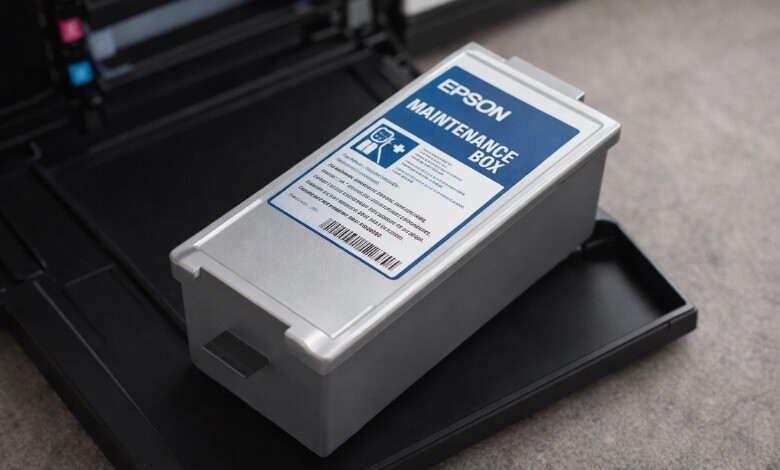
If you’re wondering what a maintenance box on an Epson printer is, it’s a small but vital part of your printer’s cleaning system that helps keep things running smoothly. In simple terms, a maintenance box is a part of your Epson printer that collects excess ink during cleaning and printing processes. Over time, this ink builds up, and the box fills up with this used ink, preventing it from spilling onto your printer or workspace.
Now, you might not pay much attention to it, but it’s a key element to ensure your Epson printer continues to function smoothly. Let’s dive into what maintenance boxes do, how long they last, and how to properly dispose of them.
-
 Epson C4000 Maintenance Box SJMB4000 SKU: C33S021601$39.00
FREE SHIPPING over $199*
Orders before 12PM EST usually Ship Same Business Day -
 Epson ColorWorks C6000 / Epson C6500 Maintenance Box SJMB6000/6500 for CW6000 / CW6500 SKU: C33S021501$39.00
FREE SHIPPING over $199*
Orders before 12PM EST usually Ship Same Business Day - Epson ColorWorks C3500 Maintenance Box SJMB3500 for Epson C3500 SKU: C33S020580 GTIN: 4988617161726$41.00
FREE SHIPPING over $199*
Orders before 12PM EST usually Ship Same Business Day
What Do Maintenance Boxes Do For My Printer?
A maintenance box serves as a safety net for your printer. As your Epson printer performs its regular print jobs, the ink delivery system, especially during print head cleaning, generates extra ink that must go somewhere. That’s where the Epson maintenance box steps in. The maintenance box stores the extra ink that’s discarded during your printer’s head cleaning cycles, preventing any overflow or spills.
Without this box, excess ink would spill into your printer or your workspace, leading to potential messes and printer malfunctions. This component is essential for keeping your printer clean and preventing internal messes, helping it last longer. Think of it as a safety valve for your printer’s health. By collecting excess ink, the maintenance box ensures your printer functions smoothly, avoiding performance hiccups.
How Long Does a Maintenance Box Last?
You might wonder, How long will this box last before you need a replacement? The answer isn’t as simple as one-size-fits-all, as it depends on how often you use your printer. Depending on how often you print, the maintenance box can last a few months before it fills up completely. However, if you perform frequent cleaning cycles or heavy printing jobs, it could fill up faster.
Generally speaking, the maintenance box will last for around 30,000 pages before needing a change. But, don’t wait until it’s completely full to check—keep an eye on your printer’s
maintenance notifications or warnings. Epson printers will usually let you know when the Epson maintenance box is full and needs to be replaced. Keeping track of this helps you avoid any surprises.
How can A Maintenance Box Be Disposed of?
Now, the question arises: How should you dispose of the Epson maintenance box when it’s full? Replacing and disposing of maintenance boxes is a straightforward task—simply swap out the full one for a new one when it’s time.
Be sure to follow the specific disposal instructions provided by the manufacturer to avoid improper disposal of ink waste. Most Epson printer maintenance boxes come with guidelines on how to safely dispose of the used ink. Typically, you can recycle the maintenance box at a local recycling center, ensuring you follow the rules for recycling ink-related items. Never throw it in the trash, as ink can leak and damage the environment.
If you don’t know where to dispose of it, contacting your local recycling center or even your printer’s service provider can help guide you through the proper disposal process.
Where Can I Find A Maintenance Box?
Finding an Epson maintenance box isn’t a hassle. At TCS Digital Solutions, we provide high-quality Epson maintenance boxes that are compatible with your printer model. Our expert team ensures that you get the right box, and we deliver it promptly so you can keep your printer in tip-top shape.
Don’t let the Epson maintenance box fill up and cause disruptions to your printing. By replacing it on time, you’ll avoid any messes and ensure that your Epson printer keeps running smoothly for a long time. So, don’t hesitate to check out TCS Digital Solutions for all your Epson maintenance needs.
- Epson C4000 Maintenance Box SJMB4000 SKU: C33S021601$39.00
FREE SHIPPING over $199*
Orders before 12PM EST usually Ship Same Business Day - Epson C4000 / CW-C4000 ColorWorks Inkjet Label Printer (Gloss) SKU: C31CK03A9991$2,492.00
FREE SHIPPING over $199*
Orders before 12PM EST usually Ship Same Business Day -
 Epson ColorWorks C8000 / C7500 / C7500G / C7500GE Maintenance Box SJMB7500 SKU: C33S020596 GTIN: 4988617196117$42.00
FREE SHIPPING over $199*
Orders before 12PM EST usually Ship Same Business Day
Final Thought
The bottom line is that the Epson maintenance box on your Epson printer plays a vital role in ensuring your printer operates smoothly and efficiently. It collects excess ink, preventing messes and printer malfunctions. Though it’s not the flashiest part of your printer, the maintenance box does a crucial job in keeping your printer running without a hitch.
Remember to replace the maintenance box regularly, especially if you notice the ink box is filling up or receiving warning alerts from your printer. And if you’re unsure about where to find a reliable maintenance box, feel free to check out TCS Digital Solutions for top-notch options and customer support.
Have more questions related to the Epson Maintenance Box? Contact our support team via email at orders@tcsdigitalsolutions.com or make a call at +1 (762) 208-6985 to get clarification for all your questions. The TCS Digital Solutions Expert Support Team will be happy to assist you. To learn more about Epson printers, visit our blog section and get answers to all your questions.

