

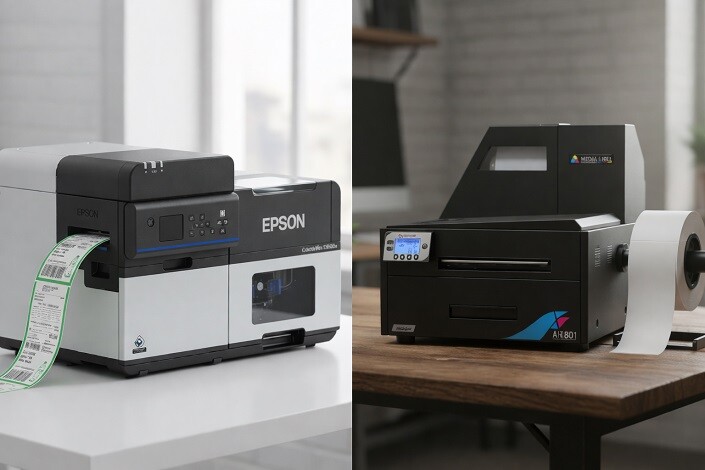
Printing technology has evolved significantly over the years, with two major processes dominating the industry: offset printing and digital printing. Each method offers distinct advantages and challenges depending on the project requirements. In this article, we’re going to look into Offset Printing vs Digital Printing: Pros, Cons, and Best Use Cases, comparing the two printing technologies to help you choose the best option for your needs.
-
 Epson ColorWorks C8000 Matte Inkjet Color Label Printer SKU: C31CL02A9981$9,630.00
FREE SHIPPING over $199*
Orders before 12PM EST usually Ship Same Business Day -
 Epson C4000 / CW-C4000 ColorWorks Inkjet Label Printer (Gloss) SKU: C31CK03A9991$2,492.00
FREE SHIPPING over $199*
Orders before 12PM EST usually Ship Same Business Day - Afinia L701 Digital Color Label Printer SKU: 31854$5,550.00
FREE SHIPPING over $199*
Orders before 12PM EST usually Ship Same Business Day
Here, We Compare Offset vs Digital Printing: Pros and Cons
The world of printing has seen a shift from traditional methods to modern, high-tech processes. While offset printing remains a staple for large-scale production runs, digital printing is gaining momentum for smaller projects and custom orders. Where do you begin to decide which one to choose?
Offset Printing
An offset printing technique involves inking an image on a plate and then transferring it (or “offsetting”) to a rubber blanket and then printing it onto a surface like paper. High-volume printing jobs are often handled with this method, including books, magazines, and newspapers. It’s known for producing sharp, clean images and consistent quality, especially on larger print runs. Offset printing requires creating custom plates for each job, making it more suited for larger quantities rather than small, custom jobs.
Pros
- Quality and Consistency: Offset printing is frequently cited as producing high-quality prints with sharp images and accurate color reproduction. Because of even ink distribution, consistency is achieved in the final product. Business owners who require flawless print runs should consider offset printing as the gold standard.
- Cost-Effective for Large Runs: If you have a large order, offset printing becomes more cost-effective per piece. The initial setup may be expensive, but when printing in bulk, the price per print drops significantly.
- Variety of Materials: Offset printing is suitable for printing on a wide array of materials. The printer is capable of handling a wide variety of paper types and weights, making it an ideal choice for business cards to posters.
Cons
- Setup Time and Costs: The initial setup for offset printing requires creating plates and configuring the press, which can take time and increase costs, especially for smaller runs. Consequently, it isn’t ideal for printing short runs or urgent orders.
- Not Ideal for Variable Data: Offset printing doesn’t work well for printing variable data, like personalized names or addresses, which digital printing excels at.
- Limited Flexibility: Once the plates are made, changes to the design or content can be expensive and time-consuming. Due to this lack of flexibility, it can be difficult to adjust designs quickly.
Digital Printing
In digital printing, digital files (such as PDFs or other image files) are sent directly to the printer without requiring plates or other manual preparation. Digital printers use inkjet or laser technology to apply the image directly to the printing surface, making it a much faster and more flexible option than offset printing. Digital printing is particularly beneficial for small runs, customization (like variable data printing), and short turnaround times. It’s commonly used for projects such as personalized invitations, business cards, or short-run brochures.
Pros
- Fast Turnaround: Digital printing doesn’t require plates or extensive setup, which means you can get your prints in a fraction of the time. When you need a quick turnaround, digital printing is a good option.
- Cost-Effective for Small Runs: When compared with offset printing, digital printing offers significant cost savings due to fewer setup fees and plate costs. When only a few hundred prints are needed, digital may be the better option.
- Customization: Digital printing has the main advantage of allowing customization. Variable data printing allows each print to be tailored individually, which is perfect for things like personalized invitations or direct mail campaigns.
- Less Waste: Digital printing uses only the amount of ink needed for each project, reducing waste and saving costs in the process.
Cons
- Limited Paper Options: While digital printing can handle a variety of paper types, it still has limitations compared to offset. Some types of heavy or textured paper may not work well in digital printers.
- Color Consistency: Digital printing does not always produce identical color renditions as offset printing. The color matching can vary slightly, especially on larger print runs.
- Higher Cost for Large Runs: For very large runs, digital printing can become more expensive than offset due to the higher cost per unit. The economies of scale that offset printing offer are unmatched for massive projects.
When to Use It and Why
It is important to decide which printing method is best for you, based on your specific needs: offset or digital printing. The following is a breakdown of when each method should be used:
Printing Medium
- Offset: Best for large, flat materials like magazines, brochures, and newspapers. It works well on a wide range of standard paper types, but it may struggle with more unique substrates.
- Digital: Ideal for materials with smaller print runs or specialty substrates that offset printing cannot handle efficiently.
Quantity
- Offset: If you need to print large quantities, offset is the most appropriate choice. It is an excellent option for large production runs.
- Digital: In small and medium print jobs, digital printing is generally less expensive and faster. It excels in short runs.
Turnaround Times
- Offset: Due to setup time, offset printing takes longer. You should not use this method for projects that have short deadlines.
- Digital: Digital printing has a fast turnaround, making it ideal for urgent printing projects.
Proofing
- Offset: The proofing process can be more costly and time-consuming with offset due to the necessity of creating plates.
- Digital: Digital printing offers quick and inexpensive proofs, allowing for faster adjustments to designs and content.
Colors
- Offset: If color accuracy is a top priority, offset printing offers superior results with precise color matching.
- Digital: While digital printing has improved in color consistency, it’s not as reliable as offset for high-precision color matching.
Customization
- Offset: Limited to standard prints and does not excel at variable data printing.
- Digital: Perfect for personalized printing jobs, such as custom names or addresses on direct mail campaigns.
Why Should You Convert to Digital Printing From Offset?
As businesses demand more flexibility, quicker turnaround times, and the ability to cater to personalized orders, many are making the switch from offset to digital printing. Here’s why you should consider converting:
Versatility
Digital printing is incredibly versatile. Whether you’re printing a few pages or several hundred, digital technology allows you to handle both without needing a complex setup or extensive equipment.
Color Matching
With advances in digital technology, color matching has improved. While it may not yet reach the level of offset, modern digital printers can produce very close color accuracy, particularly when paired with color management systems.
Handling Errors
Digital printing allows for immediate changes and adjustments without the cost of reprints or delays. Mistakes made in the design or content can be corrected quickly, unlike in offset printing, where changes can be expensive.
More Choice of Substrates
Digital printers can handle a wide variety of substrates, offering more options for creating unique projects.
Customization and Personalization
If your printing needs involve customization, digital printing is the go-to method. From personalized invitations to bespoke marketing materials, digital printing offers flexibility.
Equipment Cost
While digital printing equipment may seem expensive upfront, it eliminates ongoing costs associated with plates, setup, and maintenance, making it more affordable in the long term.
A Comparison of Industrial Inkjet and Offset Printing
Industrial inkjet printing is often used for high-volume printing, similar to offset printing, but with some key differences. Inkjet printing has lower setup costs and offers more flexibility in terms of materials and print sizes. However, offset printing is able to deliver better color accuracy and consistency than digital printing. For many businesses, hybrid systems that combine offset and inkjet printing provide the best of both worlds.
Where Can I Buy Digital Printers?
If you’re ready to make the shift to digital printing, TCS Digital Solutions provides top-of-the-line digital printers that can meet all your printing needs. With a wide selection of digital printing equipment, we can help you find the right machine for your business requirements. Visit TCS Digital Solutions to explore our range of digital printers.
-
 QuickLabel QL-425 Compact A4 Digital Inkjet Label Press$35,195.00
FREE SHIPPING over $199*
Orders before 12PM EST usually Ship Same Business Day - Afinia F502 Fanfold Color Label Printer (Dye Version) SKU: 35431$2,645.00
FREE SHIPPING over $199*
Orders before 12PM EST usually Ship Same Business Day - Trojan Label T2 High Volume Digital Label Press Color Label Printer SKU: 10000110-N Trojanlabel$67,195.00
FREE SHIPPING over $199*
Orders before 12PM EST usually Ship Same Business Day
Final Takeaway
Digital printing and offset printing are both good choices for different projects, depending on the project requirements. Offset printing excels at large print runs with superior color accuracy, while digital printing offers speed, flexibility, and customization. Depending on your needs, you may find one option more suitable than the other.
Have More Questions related to label printing? Contact our support team via email at orders@tcsdigitalsolutions.com or call +1 (762) 208-6985 to get clarification for all your questions. Our Expert Support Team at TCS Digital Solutions will be happy to assist you. To learn more about Digital Printers, visit our blog section and get answers to all your questions.
FAQs
Exactly What is Digital Printing?
Digital printing is a process where digital images are directly transferred to a surface, typically without the need for physical printing plates.
What Does Digital Offset Printing Mean?
Digital offset printing is a hybrid of digital and offset technologies, combining the benefits of both methods.
What Are the Differences Between Digital Printing and Offset Printing?
A digital printer is faster and more cost-effective for small runs, while an offset printer offers better quality and savings for large runs.
Do Offset Systems Print Variable Data?
No, offset systems do not handle variable data as efficiently as digital printing systems.
Are There Any Common Applications for Hybrid Offset and Digital Printing Systems?
Hybrid systems are often used for direct mail, labels, and short-run packaging where customization is required.
When It Comes to Industrial Inkjet Printing, How Does It Differ From Offset Printing?
Industrial inkjet printing can handle high-volume jobs but may lack the color precision of offset printing.
What Are the Differences Between Offset Printing and Inkjet Printing?
Offset printing offers better consistency and color accuracy, while inkjet printing provides faster setup times and is more cost-effective for smaller runs.

