

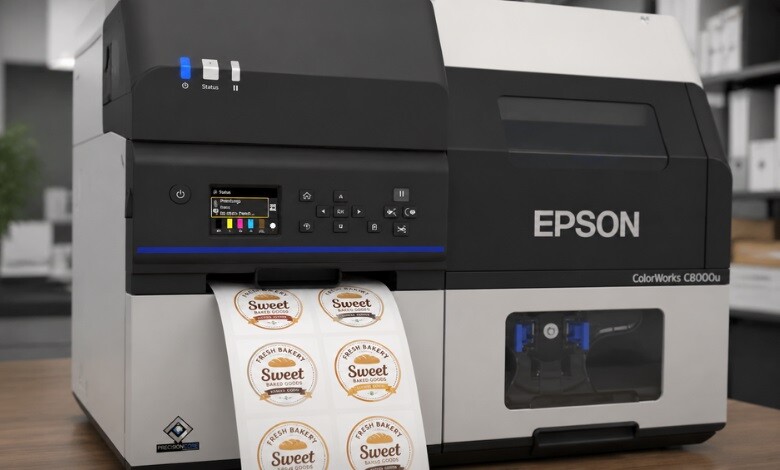
If you run a small business or print in-house, you have probably asked whether a label printer can print stickers, and the short answer is yes. A label printer can absolutely produce stickers, because labels and stickers share the same core ingredients: a printed design, an adhesive backing, and a release liner. The real question is not whether it can be done, but which printer technology and material combination will give you the look, durability, and finish you want.
Are Labels and Stickers Actually Different?
Labels and stickers are close cousins. Labels are typically printed in rolls or sheets and applied to products, packaging, or shipping boxes for identification, branding, or compliance. Stickers tend to be individually cut, more decorative, and used for promotions, giveaways, and packaging extras.
The good news is that the same machine often handles both. When you use a label printer for stickers, the difference comes down to the media you load and how the output is finished. Print on standard label stock, and you get labels. Print on gloss or vinyl sticker material, then die-cut or kiss-cut it, and you get stickers.
-
 Primera LX600 Color Label Printer SKU: LX600$1,995.00
FREE SHIPPING over $199*
Orders before 12PM EST usually Ship Same Business Day - Epson C4000 / CW-C4000 ColorWorks Inkjet Label Printer (Gloss) SKU: C31CK03A9991$2,492.00
FREE SHIPPING over $199*
Orders before 12PM EST usually Ship Same Business Day -
 Afinia L801 Plus Commercial Color Label Printer SKU: 32498$8,850.00
FREE SHIPPING over $199*
Orders before 12PM EST usually Ship Same Business Day
Which Label Printer Technology Works Best for Stickers?
Not every printer produces the same result. Here is how the main technologies compare when printing stickers.
Inkjet color label printers.This is the most popular choice for full-color stickers. A color label printer for stickers reproduces vivid logos, photos, and gradients on gloss, matte, and synthetic media. If you sell branded products, this technology gives stickers true retail-shelf appeal. Popular inkjet options for sticker work include Afinia, Epson ColorWorks, and Primera label printers.
Thermal label printers. A thermal label printer for stickers is excellent for high-volume, single-color work such as barcodes, address labels, and price stickers. Direct thermal printers need no ink, while thermal transfer models use a ribbon for longer-lasting prints. They are fast and economical, but are not designed for colorful artwork.
Laser printers. Laser machines can print sticker sheets and are fine for occasional internal use, but they lack the roll-fed convenience and material range of dedicated label printers.
For most businesses producing colorful custom stickers, a dedicated inkjet color label printer offers the best balance of quality, speed, and flexibility. You can compare options on our color label printers collection at the TCS Digital Solutions online store.
Picking the Right Sticker Material
The material matters as much as the printer. Common choices include:
- Gloss paper: affordable and bright, best for indoor stickers and packaging inserts.
- Matte paper: a softer, premium look that resists glare.
- White vinyl / synthetic: the go-to for a label printer for waterproof stickers, since it resists moisture, scuffs, and UV fading.
- Clear film: creates a “no-label” look on jars and bottles.
If your stickers will face water, refrigeration, or the outdoors, choose a synthetic or vinyl material paired with pigment ink for the longest-lasting results.
Can a Label Printer Print Different Sticker Shapes?
Yes. With the right setup, a label printer for round stickers is just as easy as printing squares or rectangles. Many label printers pair with a cutter or finisher that kiss-cuts custom shapes, leaving the backing intact so stickers peel away cleanly. For die-cut and shaped output, a printer-plus-finisher workflow gives you professional results in-house. Brands like VIPColor and QuickLabel offer machines suited to this. Browse machines built for this on our sticker printers page.
How to Print Label Stickers Step by Step
Knowing how to print label stickers correctly keeps your output crisp and consistent:
- Design your artwork at the correct dimensions, using high-resolution images and accurate brand colors.
- Load the right media, matching the roll or sheet size to your printer’s specifications.
- Set the correct print profile for your material type so colors and contrast render accurately.
- Run a test print to check alignment, color, and cut position before a full run.
- Finish and apply, peeling individually or using a label applicator for speed.
A short test run before printing in bulk is the easiest way to avoid wasted material.
Who Should Print Stickers In-House?
Printing your own stickers makes sense for product brands, e-commerce sellers, coffee roasters, candle makers, and event marketers. Bringing production in-house removes minimum order quantities, shortens turnaround, and lets you update designs whenever you need to. A color label printer for a small business often pays for itself by cutting outsourcing costs and giving you full creative control. For businesses with higher print volumes, TrojanLabel digital label presses are built to scale with demand.
For more on choosing equipment, see our guides on choosing the right color label printer and label material selection. You can also review independent printing best practices from the Printing United Alliance for a broader industry context.
- VIPColor VP750 Color Label Printer$8,000.00
FREE SHIPPING over $199*
Orders before 12PM EST usually Ship Same Business Day - VIPCOLOR VP550 Bundle Color Label Printer w Water Resistant Ink & Unwinder SKU: VP-550Bundle$4,495.00
FREE SHIPPING over $199*
Orders before 12PM EST usually Ship Same Business Day - TrojanLabel T2-C Tabletop Mini Press VP Label Printer DGN INK SKU: 10000155$33,595.00
FREE SHIPPING over $199*
Orders before 12PM EST usually Ship Same Business Day
Final Thoughts
So, can a label printer print stickers? Without a doubt. With the right printer technology, the correct material, and a simple finishing step, a label printer becomes a complete in-house sticker solution for branding, packaging, and promotion.
Would you like more information about whether a label printer prints stickers? Contact our expert support team at orders@tcsdigitalsolutions.com or call +1 (762) 208-6985. Visit our blog for more insights.
Frequently Asked Questions
Are Label Printer Stickers Waterproof?
They can be. Waterproofing depends on the material and ink. Vinyl or synthetic stock with pigment ink resists water and fading well.
Do I Need Special Software to Print Stickers?
Most label printers include design software, and many also work with standard design tools. The key is exporting artwork at the right size and resolution.
Can One Printer Do Both Labels and Stickers?
Yes. The same machine handles both; you simply change the media and finishing method to match your goal.

