


If you’re deciding how large your label text should be, our Font Size Guide: Points to Inches for Label Printing helps you calculate sizes and check the finished result.
Divide the font’s point size by 72 to convert it to inches. For example, 12 pt equals approximately 0.167 inch, and 72 pt equals 1 inch. These measurements describe the font’s nominal size, or sizing scale, rather than the exact height of its printed letters.
At TCS Digital Solutions, we’ll walk you through the conversion chart, explain why fonts look different at the same size, and show you what to check before printing your next batch.
-
 Afinia L801 Pro Commercial Color Label Printer with $525 Free Blank Labels SKU: 44825$7,995.00
FREE SHIPPING over $199*
Orders before 12PM EST usually Ship Same Business Day -
 Epson Colorworks D3800 Printer$1,499.00
FREE SHIPPING over $199*
Orders before 12PM EST usually Ship Same Business Day -
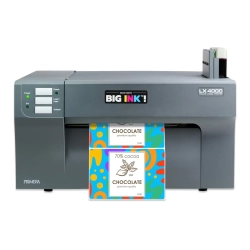 Primera LX4000 Color Label Printer – Pigment Ink$3,295.00
FREE SHIPPING over $199*
Orders before 12PM EST usually Ship Same Business Day
How Do You Convert Font Sizes?
 Modern digital typography uses 72 points per inch. The W3C reference for absolute length units defines one point as 1/72 of an inch.
Use these formulas:
- Inches = point size ÷ 72
- Point size = inches × 72
- Millimeters = point size × 25.4 ÷ 72
For example, a 0.25-inch nominal size converts to 18 pt:
0.25 × 72 = 18 pt
To convert 24 pt the other way:
24 ÷ 72 = approximately 0.333 inch
These calculations help you plan your layout. However, the visible height of a printed letter depends on its shape and the typeface you choose.
Points to Inches: Font Size Conversion Chart
Use this font size to inches chart as a quick reference. Measurements are rounded to three decimal places for inches and two for millimeters.
| Font size | Nominal size in inches | Nominal size in millimeters |
| 6 pt | 0.083 | 2.12 |
| 8 pt | 0.111 | 2.82 |
| 9 pt | 0.125 | 3.18 |
| 10 pt | 0.139 | 3.53 |
| 11 pt | 0.153 | 3.88 |
| 12 pt | 0.167 | 4.23 |
| 14 pt | 0.194 | 4.94 |
| 16 pt | 0.222 | 5.64 |
| 18 pt | 0.250 | 6.35 |
| 24 pt | 0.333 | 8.47 |
| 27 pt | 0.375 | 9.53 |
| 36 pt | 0.500 | 12.70 |
| 48 pt | 0.667 | 16.93 |
| 72 pt | 1.000 | 25.40 |
This font point size chart shows nominal sizes. It does not show the exact height of individual letters or establish minimum sizes for your labels.
Why Do Fonts Look Different at the Same Size?
 Fonts can look different at the same point size because their letter proportions vary.
Point size scales a font’s design space, commonly called its em square. It does not directly measure the outline of a particular character.
These terms explain what you see:
- Cap height: The distance from the baseline to the top of a flat capital letter, such as H.
- X-height: The height of a lowercase x, measured from the baseline, excluding ascenders and descenders.
- Ascender: A stroke extending above the main lowercase body, as in h.
- Descender: A stroke extending below the baseline, as in p.
Two fonts set to 12 pt can have different letter heights, widths, and stroke thicknesses. One may look larger or be easier to read.
Compare the same words at identical sizes. Include mixed-case text and numbers that resemble your finished label.
What Font Size Equals 3/8 Inch?
Three-eighths of an inch equals 27 pt in nominal font size.
The calculation is:
0.375 × 72 = 27 pt
However, a capital H or lowercase x set to 27 pt will not necessarily measure 3/8 inch tall.
If your project calls for a specific visible letter height, measure the relevant character in the finished proof. Adding one or two points does not guarantee that measurement because fonts have different proportions.
Use the conversion to choose a starting size, then check the actual lettering.
How Should You Choose Text Sizes for Labels?
 Start with the information your customer needs to find first. Give your product name more emphasis than supporting details.
A simple text hierarchy includes:
- A larger product name.
- A medium-sized variant or description.
- Smaller supporting text with enough spacing to read comfortably.
For a hypothetical 3-by-2-inch label, you might compare a 20 pt product name, a 12 pt description, and 10 pt supporting text. These are starting points for a mockup, not universal recommendations.
Allow space for your logo, margins, and other content. A short product name may fit on one line, while a longer name may need several lines.
If your layout feels crowded, shorten unnecessary wording or reorganize the content before shrinking every line.
Our printed label design tips and best practices offer more guidance on dimensions and layout planning.
How Do Contrast and Font Weight Affect Readability?
 Clear contrast and suitable font weight help readers distinguish letters from the background.
Small text can become difficult to read when its strokes are thin or its background is busy. Start with dark text on a light background, or another combination with a clear visual difference.
Avoid placing small text over photographs or detailed patterns. Compare regular and medium font weights before choosing a very light style.
Check the spaces inside letters such as e and a on your proof. If those spaces appear filled or unclear, try a larger size, another weight, or a different typeface.
Review our color theory tips for label design for more ideas about text and background combinations.
Does Printer Resolution Change Font Size?
Printer resolution affects how text is reproduced, but it does not change the point-to-inch conversion.
A 12 pt setting keeps the same nominal physical size when printed at the intended scale. Resolution and output settings can affect how smooth its edges appear.
At 300 dpi, a 12 pt em corresponds to 50 dot positions in the printer’s output grid:
12 ÷ 72 × 300 = 50
This describes the nominal em size, not the exact height of a printed letter. Font design, rendering, ink, and label stock also affect the result.
When comparing a color label printer, review its supported media and print settings alongside your artwork needs.
We also carry the Primera LX4000 pigment model. Its product page provides details you can use when comparing equipment for your workflow.
Check Your Label Before Printing a Batch
 A printed proof helps you confirm measurements and readability before committing to a full run.
- Set the correct dimensions. Match your document and driver settings to the label stock.
- Check the artwork scale. Print at actual size or 100% where available. Add a 1-inch reference line to a test proof and measure it to check for unintended scaling.
- Preserve text quality. Keep text as text or vector artwork when your workflow supports it.
- Confirm the fonts. After exporting or reopening the file, check that the intended typefaces are still in place.
- Use the intended stock. Surface texture and finish can affect fine details.
- Inspect the finished label. Read it at a normal viewing distance and measure any dimensions your project requires.
- Save approved settings. Record the font, size, stock, scale, and output settings for repeat jobs.
Get Help With Your Label Printing Setup
At TCS Digital Solutions, we can help you compare equipment options for your label size and application. If you’re choosing a label printer, share your stock, artwork, and production needs with our team.
Email orders@tcsdigitalsolutions.com or call +1 (762) 208-6985. For more practical guidance, explore our label printing blog.
-
 Primera LX910 Color Label Printer SKU: LX910$2,749.00
FREE SHIPPING over $199*
Orders before 12PM EST usually Ship Same Business Day -
 Primera LX600 Color Label Printer SKU: LX600$1,995.00
FREE SHIPPING over $199*
Orders before 12PM EST usually Ship Same Business Day -
 Quick Label QL-120X Inkjet Color Label Printer with 2 Year Warranty SKU: 42725200$8,395.00
FREE SHIPPING over $199*
Orders before 12PM EST usually Ship Same Business Day
Frequently Asked Questions
How Many Points Are in an Inch?
There are 72 points in one inch in modern digital typography. Divide a point size by 72 to convert it to inches, or multiply inches by 72 to convert them to points.
How Big Is 12 Pt Font in Inches?
A 12 pt font has a nominal size of approximately 0.167 inch, or 4.23 millimeters. The visible height of its letters depends on the typeface and character.
Does an On-Screen Font Size Chart Show Actual Printed Size?
Not necessarily. A chart’s numerical conversions can be correct, but display zoom and screen scaling can change how large its samples appear. Print a proof at actual size to check physical dimensions.
What Is the Smallest Readable Font for a Label?
There is no universal smallest readable font size for every label. Readability depends on the typeface, weight, contrast, printing quality, stock, and viewing distance. Test your actual text on the intended stock before production.

